MD170B Digital watch face
Matteo Dini MD ® Watch FacesPersonalization
4.6203.00 Reviews
- Version
- Varies With Device
- Installs
- 50.00K
- Age Rating
- Everyone
Screenshots
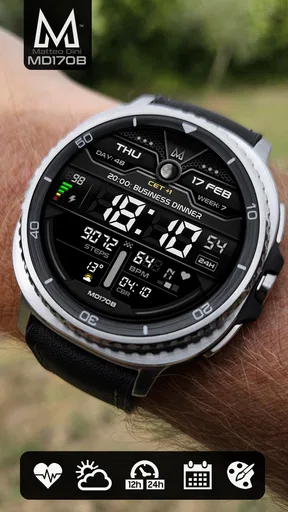
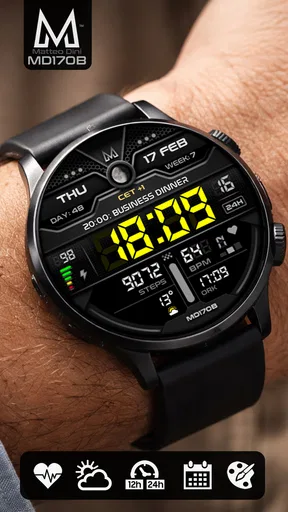
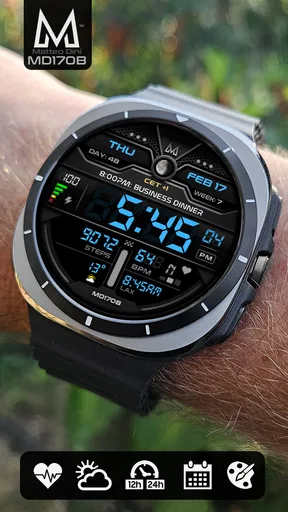
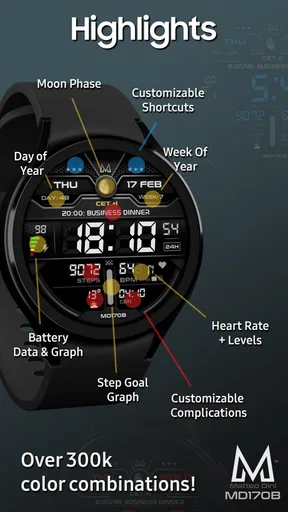
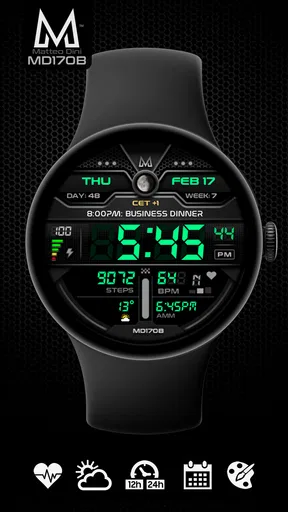
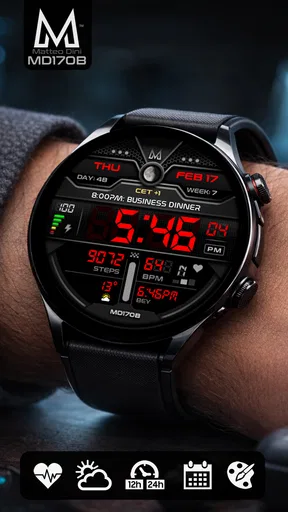
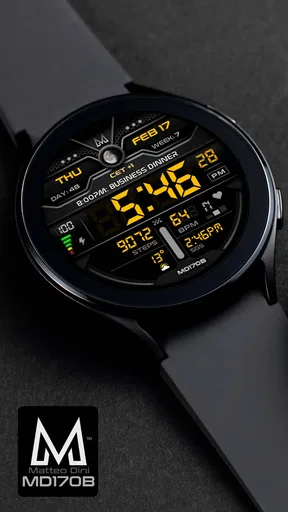
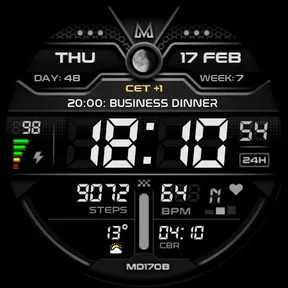
Our Review of MD170B Digital watch face
 Analysis by Appyee
My first useful piece of advice for a new watch-face install is to think about what you want to see without reaching for your phone. A glance at the time and date is one kind of setup; a quick check of activity or another complication is a different one. I find that choosing the job first makes personalization easier and keeps the finished face from becoming a crowded little dashboard.
What to expect from this digital face
MD170B Digital watch face is a paid Wear OS personalization app from Matteo Dini MD ® Watch Faces. It costs $2.99, is rated for Everyone, and is aimed at people who want to shape a digital watch face around their preferences rather than settle for a fixed layout. Its average rating is 4.6 from around 1.7K ratings, with over 50K installs, so there is a sizeable group of smartwatch owners who have tried it.
The central appeal is the balance between a clear digital presentation and customizable complications. I would approach it as a way to make information you already care about easier to check, not as a replacement for a fitness app, weather service, or phone notifications. The face can make selected details convenient to glance at, but the usefulness depends on which complications your watch and setup can actually show.
That distinction matters if you are buying it mainly for a particular data point. Before paying, consider whether that information is available as a complication on your Wear OS watch and whether you are comfortable choosing it in the watch-face settings. If your priority is simply a different decorative look, a free built-in face may be enough; the paid option makes more sense when you want this particular digital style and the freedom to tailor its information.
A calmer first setup
After installing it, I would take a moment to apply the face from the watch or companion setup flow, then open its customization controls. The exact route can vary by watch, so I would follow the options shown on the device rather than assume every Wear OS model presents identical menus. The first goal is not to explore every setting. It is to get the time readable and select only the information you know you will use.
A practical starting arrangement is to keep the most frequently checked detail near the time and leave less important complications out until you know you want them. This is a small but useful trade-off: every extra item can save a trip into an app, but a dense face can make the main time display harder to scan. I prefer beginning with a restrained layout, using it through an ordinary day, and then adding one complication at a time.
Color choices are worth testing in the places where you actually look at your watch. A shade that looks striking indoors may be less comfortable in bright outdoor light, while a subtler combination may suit a quick glance better. Rather than changing several visual options at once, adjust one element, check it on your wrist, and keep the version that stays legible in your routine. That makes it easier to tell which change helped.
The first meaningful success
For me, a successful setup is not a perfect-looking screenshot; it is being able to answer a small everyday question without opening the phone. On a morning walk, for example, I might want to check the time and see a chosen activity complication at a glance. At work, I might prefer a cleaner arrangement that keeps the display easy to read during a meeting. Those are different uses, and the face is most helpful when its selected details match the moment.
Try the first configuration for a full stretch of normal wear before deciding it needs more. Notice what you instinctively look for and what you never use. If a complication is present but rarely useful, replace it or simplify the layout; if you keep opening the same phone app, that may be a clue to give its corresponding information a more prominent place when available. This short test is more reliable than trying to design the ideal face all at once.
I also recommend checking the watch after the display has been idle and woken again, rather than judging it only while actively editing. A watch face has to work in quick, imperfect glances: walking between rooms, carrying bags, or checking the time outdoors. The most successful arrangement is usually the one that makes the essential information obvious without asking you to study the screen.
Hey there, tech enthusiasts! So, I recently got my hands on the MD170B Digital watch face, and let me tell you, it’s been quite the journey. If you're like me and love customizing your smartwatch to reflect your style and needs, you're in for a treat.
First Impressions
From the moment I downloaded the MD170B Digital watch face, I was intrigued by its sleek and modern design. The vibrant display options and the flexibility it offers in terms of personalization are impressive. Whether you're into minimalistic designs or something a bit more flashy, this app has got you covered.
Design and Aesthetics
Let's dive into the aesthetics first. The watch face sports a digital layout that's both stylish and functional. It features a dynamic background that adapts beautifully to different lighting conditions. One thing that caught my eye was the way the colors pop, making it easy to read even in direct sunlight.
Customization is where it truly shines. You can tweak everything from color schemes to the types of data displayed. Want your steps and heart rate front and center? No problem. Prefer a minimal clock with just the date? Easy peasy. It feels like this app is designed to cater to every whim.
Functionality and Features
Now, onto the nitty-gritty of what this app can do. This digital face isn’t just about looking good; it’s also packed with features that make it a practical choice for everyday use.
- Health Tracking: You get real-time updates on your steps, heart rate, and even calories burned. For fitness buffs, this is a game-changer.
- Weather Updates: Stay ahead of the weather with timely forecasts displayed right on your wrist.
- Battery Life: Surprisingly, despite its dynamic features, I found the battery consumption to be pretty efficient. It didn’t drain my smartwatch as fast as I expected, which is always a bonus.
What I particularly loved was the seamless integration with my smartphone. Notifications were crisp and clear, and I didn’t have to constantly fiddle with settings to get things working perfectly.
User Experience
Installing and setting up this watch face was a breeze. The interface is user-friendly, and even if you’re not tech-savvy, you’ll find your way around in no time. The app provides a quick tutorial on first launch, which I found helpful for getting started.
The responsiveness of the watch face is top-notch. Swiping through the different screens is smooth, and there’s no noticeable lag, which is often a concern with feature-heavy watch faces.
Choosing it over the usual alternatives
Compared with the standard faces bundled with a watch, a customizable digital face can be a better fit if you want to decide which details deserve space. The trade-off is that a built-in option may be simpler to set up and costs nothing extra. I would choose this one when its particular visual design appeals to me and I expect to adjust the complications; I would stick with the default if I rarely change my watch’s appearance or only need a plain clock.
It also sits in a different lane from a specialist fitness display. A face can put selected figures within easy reach, but it is not where I would go for a detailed workout history or careful analysis. For those jobs, I would keep using the relevant health app and treat the watch face as a quick-glance companion. That avoids expecting a small display to do the work of a full app.
One non-obvious way to make the choice is to consider how often you look at each complication, not how impressive the list sounds. A rarely checked metric takes up visual attention without helping much. If you are unsure, start with the time and one useful detail, then change the arrangement only after a few days reveal a real need. The value is in reducing friction, not in filling every available space.
Where the setup can feel confusing
Customization can make a first setup feel less obvious than choosing a stock face. A complication is not necessarily a new feature supplied by the watch face itself; it can be a slot where a compatible source provides information. If a preferred item does not appear among the choices, I would first check the watch’s available complication options instead of repeatedly changing the face’s colors or layout. That separates a compatibility issue from a visual setting.
Another common snag is expecting the phone and watch to present the same controls. Wear OS devices can organize setup differently, so a setting that is easy to find on one watch may appear in another place on another model. I would make the changes from whichever customization screen is offered for the installed face, then check the result on the watch itself. If something looks different from the preview, the watch’s actual display is the one to trust.
For health or weather information, keep expectations practical: a glanceable complication is useful for a quick check, while a full app is better for context and detail. If an item looks blank or does not behave as expected, confirm that the relevant information is available through your watch and its chosen source before deciding the face is at fault. This is a sensible first troubleshooting step and can save a lot of aimless tapping.
Battery use is another reasonable concern with any watch face that includes several visible elements. My experience here was better than I expected, but battery results can depend on the watch and how it is used. If you notice a change, simplify the face and compare it during your usual routine before drawing a conclusion. A less crowded display may be a better everyday compromise even when the fuller version looks more exciting.
Who will get the most from it
I think this is best suited to Wear OS owners who enjoy changing the look of their watch and have a clear idea of what information they want close at hand. It can also suit someone moving from a very bare face who wants to experiment with a more informative digital layout, provided they are willing to spend a little time setting it up. Its Everyone content rating makes it suitable for a broad audience, while its purpose is specifically watch personalization.
I would skip it if you use an Apple Watch or another platform that does not support Wear OS watch faces, if you are happy with the face already on your watch, or if you expect a watch-face purchase to replace dedicated health and weather apps. The $2.99 price is easiest to justify when you will actually use the customization and prefer this design over the alternatives you already have. If you only want to try a different look for a day, a free option is a more sensible first stop.
It is also worth being honest about personal taste. A digital layout is not automatically better than an analog one, and a busy face may not suit someone who wants the watch to feel understated. I would not buy it just because it can show several kinds of information; I would buy it if the arrangement and style make my own daily checks quicker and more pleasant.
The developer, Matteo Dini MD ® Watch Faces, focuses this product on a specific wearable use rather than a broad phone-app experience. That focus is helpful when you want to customize the wrist display, but it also means the purchase makes little sense if you do not wear a compatible watch regularly. Think about your actual habits: a face you see dozens of times a day can earn its place, while a polished option you rarely wear may not.
A small routine for getting more from it
Once the first setup works, I would make one deliberate adjustment after using it for a while: remove anything that has not helped. This is more useful than endlessly cycling through colors. If you often check the date but never use a particular complication, prioritize the date; if you find yourself opening the phone for a particular glanceable item, see whether a suitable complication is available. Keeping a simple before-and-after in mind makes the change purposeful.
You can also think of the display as a tool for different parts of the day. A more information-rich arrangement may help during a walk or errands, while a restrained look can feel better at a desk or in a formal setting. Whether you choose to keep one configuration or adjust it for different preferences depends on how much you enjoy managing your watch. The key is not to turn personalization into another chore.
For a first-time buyer, the most reassuring path is straightforward: install the face, apply it, choose a readable color treatment, and set only the complications you know you want. Then wear it through a normal day and judge it by whether it answers your common questions quickly. You do not need to master every option before the face becomes useful.
Final Thoughts
All in all, this is a strong option for a compatible smartwatch owner who wants a customizable digital face with practical glanceable details. Its combination of stylish design and everyday functionality makes it a worthwhile choice for the right person. Whether you’re a fitness enthusiast, a tech geek, or just someone who loves a good-looking watch face, it is worth considering if you want to shape the display around your routine.
So, if you're in the market for something that can elevate your smartwatch game, give it a try if its design and customization match what you need. It’s available for download on both Android and iOS platforms, so no one's left out of the fun. Happy customizing!
Verdict
Strengths of MD170B Digital watch face
- Highly customizable display options.
- Smooth integration with fitness apps.
- Battery-efficient design.
- Clear and easy-to-read interface.
- Supports multiple time zones.
Limitations of MD170B Digital watch face
- Limited free features.
- Requires frequent updates.
- No support for older devices.
- Occasional syncing issues.
- Lacks advanced health metrics.
Other Releases by Matteo Dini MD ® Watch Faces
View All
MD242 Hybrid watch face
Personalization4.5

MD307 Digital watch face
Personalization4.4

MD326 3D Modern Watch Face
Personalization4.6

MD338 Hybrid watch face
Personalization4.6
Similar Picks in This Category
View All
Microsoft SwiftKey AI Keyboard
SwiftKey4.3

Wallpapers
Google LLC4.1

Zedge™ Wallpapers & Ringtones
Zedge4.7

Yandex Browser with Alice AI
Direct Cursus Computer Systems Trading LLC4.3

Ringtone Maker:create ringtone
Big Bang Inc.4.7

Fonts Keyboard
Fonts Keyboard3.9
Frequently Asked Questions
What features does the MD170B Digital watch face offer?
The MD170B Digital watch face offers a sleek design with customizable colors and display options. Users can view essential information such as time, date, battery level, and step count. It also includes a weather widget and is compatible with both Android and iOS devices, providing a seamless experience across platforms.
Is the MD170B Digital watch face compatible with my smartwatch?
The MD170B Digital watch face is compatible with most smartwatches running Wear OS or Apple WatchOS. However, it's always recommended to check the specific compatibility details on the app’s download page or your smartwatch's specifications to ensure optimal performance and functionality.
How do I customize the MD170B Digital watch face?
Customization of the MD170B Digital watch face is simple and user-friendly. Users can adjust colors, choose different display styles, and select which widgets to show. This is typically done via the companion app on your smartphone, where you can tailor the watch face to your personal preferences.
Does the MD170B Digital watch face affect battery life?
While the MD170B Digital watch face is designed to be efficient, any additional features, such as animated elements or constant updates from widgets, may impact battery life. It’s advisable to monitor usage and adjust settings to optimize battery performance on your smartwatch.
Is the MD170B Digital watch face free to download?
The MD170B Digital watch face is available as a free download, but it may offer in-app purchases for additional features or customization options. Be sure to check the app store listing for any potential costs associated with unlocking premium features or ad-free experiences.
